Don't Buy the Model O Minus Wireless Until You Read This Full Analysis
Introduction to the Ultra-Lightweight Mini Revolution
The landscape of peripherals for high-performance computing and competitive gaming has undergone a radical transformation over the last half-decade. We have transitioned from an era where "heavy and feature-rich" defined excellence to a current market where "weightless and efficient" is the gold standard. In this pivot toward speed and agility, few brands have had as significant an impact as Glorious. Their "Model" series essentially democratized the honeycomb, lightweight design that was once restricted to niche, boutique manufacturers. Within this prestigious lineage, the Model O Minus Wireless sits as a specific, highly specialized tool designed for a very particular segment of the market: the small-handed gamer and the "fingertip" grip enthusiast.
Choosing a mouse is no longer just about the sensor or the brand name; it is about ergonomics, weight distribution, and the specific physical interaction between the hand and the surface. The Model O Minus Wireless represents the culmination of years of feedback regarding its larger predecessor, the standard Model O, and its original wired variant. Despite its popularity, this is not a product that caters to everyone. High-performance peripherals often come with trade-offs in durability, battery life, or software complexity. This analysis aims to dissect those trade-offs in exhaustive detail, providing a comprehensive editorial look at whether this specific chassis deserves a spot on your desk or if it is a relic of a design trend that is beginning to age.
Design and Ergonomics: The Symmetry of Speed
The core philosophy of the Model O Minus Wireless is rooted in its low-profile, ambidextrous shape. Often compared to the industry-standard Zowie FK series, the Model O Minus takes that classic silhouette and shrinks it down to a more aggressive, compact form factor. The hump is positioned centrally but remains relatively low, which prevents the palm from feeling restricted. For users who prefer a "palm grip," this mouse will likely feel insufficient unless their hands are significantly smaller than the average adult’s. However, for "claw" and "fingertip" grip users, the low profile allows for a immense range of vertical motion, which is crucial for tracking in fast-paced titles.
The build quality is characterized by the iconic honeycomb shell. While some modern competitors have moved toward solid-shell designs that maintain low weight through advanced internal engineering, Glorious has stuck with the perforated exterior. This serves two purposes beyond weight reduction: it provides a degree of ventilation for the palm during long sessions and allows the internal RGB lighting to shine through the chassis. Critics often worry about "shell flex" or "creaking" in honeycomb mice, but this wireless iteration features reinforced side walls compared to early wired batches, resulting in a much sturdier feel. Testing reveals that unless you are applying an unrealistic amount of lateral force, the structure remains rigid and dependable.
Weight and Balance
At approximately 65 grams, the Model O Minus Wireless is remarkably light, though it is no longer the absolute lightest in its category. Brands have pushed the boundaries down to the 50-gram mark, but the 60-to-65-gram range is often considered the "sweet spot." It provides enough heft to maintain control and "stopping power" during flick shots while being light enough to eliminate wrist fatigue over eight-hour sessions. The balance point is centered, ensuring that the mouse doesn't tip forward or backward when lifted for quick repositioning—a vital attribute for low-sensitivity players who "swipe" across large mousepads.
Internal Hardware and Performance Analysis
Under the hood, the Model O Minus Wireless utilizes the BAMF Sensor, a collaborative effort between Glorious and PixArt. It boasts a 19,000 DPI ceiling, 400 IPS tracking speed, and a 1,000Hz polling rate. In practical, real-world scenarios, the sensor is flawless. There is no noticeable acceleration, jitter, or smoothing, even at higher DPI stages. While the marketing numbers (like 19,000 DPI) are largely irrelevant for professional use—most competitive players hover between 400 and 1600 DPI—the high ceiling indicates a sensor that can handle high-velocity movements without spinning out.
Wireless connectivity is handled via a 2.4GHz lag-free dongle. The transition from wired to wireless is virtually imperceptible in terms of latency. The "cord drag" that plagued previous generations is eliminated, replaced by a sense of freedom that genuinely improves performance in high-stakes environments. The included "Ascended Cable" is a high-quality USB-C paracord used for charging, and while it is flexible, the goal with this mouse is to never have to feel a cable at all.
Switch Quality and Tactile Feedback
The primary buttons (M1 and M2) utilize Glorious Switches rated for 80 million clicks. Unlike the Omron switches found in many legacy mice, these have a slightly more "crisp" and "defined" actuation. They are not as light as some might prefer for rapid-fire clicking, but they offer excellent feedback, reducing the likelihood of accidental clicks. The side buttons are well-placed for a small mouse, though they do exhibit a small amount of "post-travel," meaning the button continues to move briefly after the click has registered. This is a minor point of contention for enthusiasts but rarely affects gameplay.
The Software Experience: Glorious CORE
Management of the device occurs through the Glorious CORE software. It is a streamlined, relatively lightweight application that allows for the customization of DPI stages, polling rates, lift-off distance (LOD), and RGB lighting. One of the standout features is the ability to adjust the "debounce time." By lowering the debounce time, users can achieve faster response times, though setting it too low can occasionally lead to double-clicking issues as the switch ages. Having this level of granular control is a significant advantage for users who want to "overclock" their experience.
Find top-rated Electronics products at great prices.
Shop Amazon →Comprehensive Comparison Table
To understand where the Model O Minus Wireless stands, it is helpful to compare it against its siblings and primary competitors in the lightweight market.
| Feature | Model O Minus Wireless | Model O Wireless (Standard) | Typical Small Competitor |
|---|---|---|---|
| Weight | 65g | 69g | 60g - 63g |
| Sensor | BAMF (19k DPI) | BAMF (19k DPI) | PixArt 3395 or Proprietary |
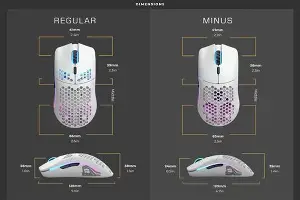
| Length | 120 mm | 128 mm | 116 mm - 118 mm |
| Grip Width | 58 mm | 60 mm | 56 mm - 59 mm |
| Switch Life | 80 Million Clicks | 80 Million Clicks | 70 - 90 Million Clicks |
| Best For | Small Hand / Fingertip | Medium Hand / All Grips | Niche Competitive Use |
Pros and Cons: A Realistic Assessment
No peripheral is perfect. The Model O Minus Wireless excels in specific areas while falling short in others that might be deal-breakers for certain users.
- Pro: Exceptional Mobility. The combination of the small footprint and 65-gram weight makes it feel like an extension of the hand rather than a tool you are gripping.
- Pro: Industry-Leading Feet. The G-Skates (100% pure Virgin PTFE) are among the best stock feet on the market. They offer a smooth, consistent glide on both cloth and "speed" surfaces without needing aftermarket replacements.
- Con: Battery Life with RGB. While rated for up to 71 hours, this is measured with the lighting turned off. With full RGB brightness, the battery life drops significantly, requiring more frequent charging than some solid-shell competitors.
- Con: Connectivity Interference. Like all 2.4GHz devices, it can be sensitive to environmental interference. Using the included extender to place the dongle directly in front of the mousepad is a requirement, not a suggestion.
- Con: Cleaning Maintenance. The honeycomb shell, while great for weight, is a magnet for dust and debris. Users in dusty environments will need to use compressed air regularly to keep the internals clean.
Buying Guide: Is This Mouse for You?
Before committing to this purchase, you must evaluate three primary factors: hand size, grip style, and "click" preference.
Hand Size and Measurement
Generally, if your hand measures less than 18cm in length (from the base of the palm to the tip of the middle finger), the Mo…Grip Style Nuances
If you use a Fingertip Grip, this is one of the best mice on the market. The low hump allows your fingers to manipulate the mouse with surgical precision. If you use a Claw Grip, it is excellent for small hands but may feel too narrow for those with wide palms. If you Palm Grip, you should almost certainly look at the standard Model O or the ergonomic Model D series instead.
Environment and Portability
Consider your setup. The wireless nature of this mouse makes it an excellent choice for laptop users or those who frequently travel to LAN events. However, because of the open-shell design, it is less "durable" in a backpack than a solid mouse. If you are an on-the-go user, a dedicated hardshell carrying case is a wise investment to protect the exposed PCB (printed circuit board) from spills or heavy dust.
The Evolution of the "Minus" Series
It is worth noting that the "Minus" series was born out of a community demand for "smaller, faster, lighter." In the early days of gaming peripherals, brands assumed that everyone wanted a large, bulky mouse. This led to a generation of players—particularly young adults and women—struggling with mice that were physically too large for their anatomy. The Model O Minus Wireless is a direct response to that historical oversight. It represents a more inclusive approach to hardware design, recognizing that "pro-grade" shouldn't mean "large-scale."
When we look at the evolution of the sensor, we see a move toward efficiency. The BAMF sensor isn't just about high DPI; it is about low power consumption. This is what allows the mouse to remain light—a smaller, lighter battery can be used because the sensor isn't "draining" the power as aggressively as older optical sensors. This synergy between weight reduction and power management is the hallmark of modern wireless engineering.
Looking for the best Electronics deals on Amazon?
See Deals →Real-World Testing: Gaming and Productivity
In testing across various genres, the Model O Minus Wireless shows its true colors. In first-person shooters like Valorant or Counter-Strike, the low weight allows for micro-adjustments that are simply harder to execute with a 90-gram mouse. In Battle Royale titles like Apex Legends, where tracking moving targets over long distances is required, the 100% PTFE feet provide a "buttery" feel that minimizes the "stuttering" often caused by friction.
Interestingly, the mouse also holds up well in productivity tasks. While it lacks the "infinite scroll" or the plethora of macro buttons found on office-centric mice, its comfort level makes it a viable daily driver for those who spend 10+ hours a day at a computer. The reduction in weight is a hidden benefit for preventing Carpal Tunnel syndrome and general repetitive strain injuries, as it requires less force from the tendons in the hand to initiate movement.
Final Analysis and Verdict
The Model O Minus Wireless is a specialized instrument. It is not the "safe" pick for everyone in the way that a medium-sized, solid-shell wireless mouse might be. Instead, it is a targeted solution for a specific problem: the need for a high-performance, ultra-lightweight, small-form-factor wireless mouse that doesn't cost as much as a high-end GPU.
The design is polarizing—you either love the honeycomb aesthetic or you worry about its longevity. The software is functional but not world-changing. However, the performance is undeniable. In terms of raw tracking, click latency, and glide consistency, it competes with the most expensive "Superlight" mice on the market while offering a shape that those larger competitors often ignore.
If you have struggled with mice feeling too "bulky" or if your wrist feels fatigued after a few hours of gaming, the Model O Minus Wireless is a transformative upgrade. It clears the path between your intent and the action on the screen. However, if you have large hands, a deep palm grip, or a dislike for RGB and perforated shells, you would likely find more comfort elsewhere. Ultimately, it is a triumph for the small-handed gaming community, providing a level of "pro" features that used to be reserved for standard-sized peripherals. Before you buy, measure your hand, check your grip, and if the specs align, you will likely find this to be one of the most agile tools ever added to your arsenal.
The transition to wireless technology has reached a point of maturity where "compromise" is no longer part of the conversation. The Model O Minus Wireless proves that you can have it all: the speed of light, the weight of air, and the reliability of a wired connection. Just be prepared to keep a can of compressed air nearby and perhaps turn the RGB down a notch to truly enjoy the freedom of a multi-day battery life.